Plan & Usage
View your subscription plan, current usage, and billing information.
Current Plan
View your active subscription plan and billing details.
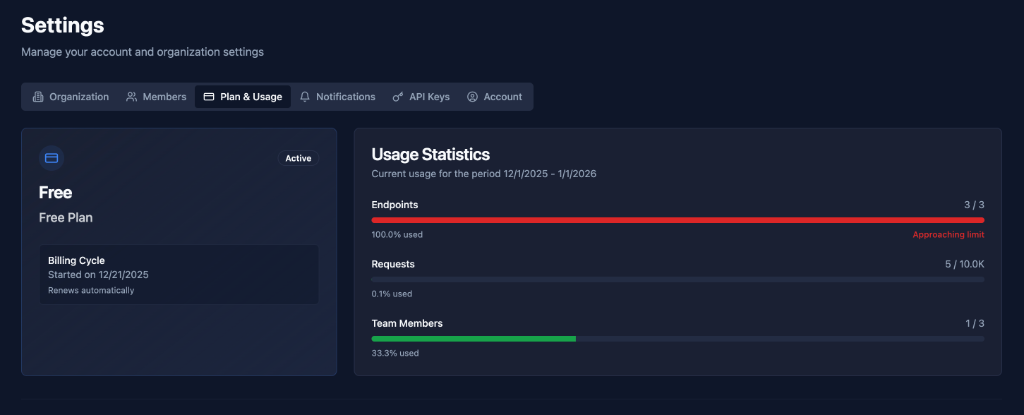
Plan Information
Plan Name: Free Plan
Status: Active (Green badge)
Billing Cycle:
- Started on: 12/21/2025
- Renews automatically
Usage Statistics
Monitor your current usage against plan limits.
Period: Current usage for the period 12/1/2025 - 1/1/2026
Endpoints
Limit: 3 / 3
Progress Bar: Shows usage percentage
Status:
- Green: Under limit
- Yellow: Approaching limit (80-99%)
- Red: At limit (100%)
What It Means:
- Number of active endpoints created
- Includes both Flow and Pulse endpoints
- Disabled endpoints don't count
At Limit: "Approaching limit" warning shown
Requests
Limit: 5 / 10.0K
Progress Bar: Shows usage percentage (0.1% used)
What It Means:
- Number of incoming webhook requests received
- Counts all requests to Flow endpoints
- Resets each billing cycle
Includes:
- Successful requests
- Failed requests
- Filtered requests
Team Members
Limit: 1 / 3
Progress Bar: Shows usage percentage (33.33% used)
What It Means:
- Number of team members in organization
- Includes all roles (Owner, Admin, Member)
- Pending invitations don't count
Plan Limits
Free Plan
Limits:
- Endpoints: 3
- Requests: 10,000/month
- Team Members: 3
- Retention: 7 days
- Support: Community
Best For:
- Personal projects
- Testing
- Small applications
- Learning hookVM
Starter Plan
Limits:
- Endpoints: 10
- Requests: 100,000/month
- Team Members: 5
- Retention: 30 days
- Support: Email
Best For:
- Small teams
- Growing applications
- Production use
- Multiple integrations
Business Plan
Limits:
- Endpoints: 50
- Requests: 1,000,000/month
- Team Members: 20
- Retention: 60 days
- Support: Priority email
Best For:
- Medium teams
- High-volume applications
- Enterprise integrations
- Critical systems
Enterprise Plan
Limits:
- Endpoints: Unlimited
- Requests: Custom
- Team Members: Unlimited
- Retention: Custom
- Support: Dedicated
Best For:
- Large organizations
- Mission-critical systems
- Custom requirements
- SLA requirements
Upgrading Your Plan
When to Upgrade
Approaching Limits:
- Endpoints at 80%+ capacity
- Requests growing monthly
- Need more team members
- Require longer retention
Need More Features:
- Priority support
- Custom integrations
- Higher rate limits
- Advanced analytics
How to Upgrade
- Contact Sales: Click upgrade button or email sales
- Choose Plan: Select appropriate tier
- Update Billing: Provide payment information
- Activate: Plan activated immediately
- Enjoy: Increased limits and features
Prorated Billing: Only pay for remaining time in current cycle
Usage Monitoring
Track Usage
Daily:
- Check usage statistics
- Monitor approaching limits
- Plan for growth
Weekly:
- Review trends
- Identify patterns
- Optimize usage
Monthly:
- Analyze full cycle
- Plan upgrades
- Budget for next month
Usage Alerts
Automatic Notifications:
- 80% of limit reached
- 90% of limit reached
- 100% of limit reached
Actions:
- Upgrade plan
- Optimize usage
- Remove unused resources
Best Practices
Plan Selection
✅ Start Small: Begin with Free plan
✅ Monitor Usage: Track growth patterns
✅ Upgrade Proactively: Before hitting limits
✅ Consider Growth: Plan for 3-6 months ahead
Usage Optimization
✅ Remove Unused Endpoints: Clean up regularly
✅ Archive Old Data: Respect retention limits
✅ Optimize Requests: Reduce unnecessary webhooks
✅ Manage Team Size: Only invite needed members
Cost Management
✅ Review Monthly: Check usage and costs
✅ Set Budgets: Know your spending limits
✅ Optimize Resources: Use efficiently
✅ Plan Upgrades: Budget for growth
Billing
✅ Keep Payment Updated: Avoid service interruption
✅ Review Invoices: Check for accuracy
✅ Use Annual Billing: Save with yearly plans
✅ Track Expenses: Monitor spending
Common Scenarios
Hitting Endpoint Limit
Scenario: Need more than 3 endpoints
Options:
- Upgrade to Starter: Get 10 endpoints
- Consolidate: Combine similar endpoints
- Remove Unused: Delete old endpoints
Exceeding Request Limit
Scenario: Approaching 10K requests/month
Options:
- Upgrade Plan: Get higher limit
- Optimize: Reduce unnecessary requests
- Filter: Use relay filters to reduce volume
Need More Team Members
Scenario: Team growing beyond 3 members
Options:
- Upgrade to Starter: Get 5 members
- Prioritize: Keep most critical members
- Share Accounts: Use shared credentials (not recommended)
Troubleshooting
Cannot Create Endpoint
Possible Causes:
- Endpoint limit reached
- Plan expired
Solutions:
- Check endpoint usage
- Upgrade plan
- Remove unused endpoints
Requests Being Rejected
Possible Causes:
- Request limit exceeded
- Plan expired
Solutions:
- Check request usage
- Upgrade plan
- Wait for next billing cycle
Cannot Invite Member
Possible Causes:
- Team member limit reached
Solutions:
- Check member usage
- Upgrade plan
- Remove inactive members
Next Steps
- Organization - Configure organization
- Members - Manage team
- Notifications - Configure alerts
Monitor your usage and upgrade when needed to support your growth! 📊