Webhook Playground
Test and debug webhooks in real-time with your personal playground endpoint.
What is the Playground?
Playground is your personal webhook testing environment. It provides:
- Auto-Generated URL: Unique endpoint created automatically
- Real-Time Monitoring: See webhooks as they arrive
- Mock Webhooks: Send test webhooks from popular platforms
- Request Inspection: View headers, body, and query params
- No Configuration: Start testing immediately
Playground Page
Your personal testing environment for webhooks.
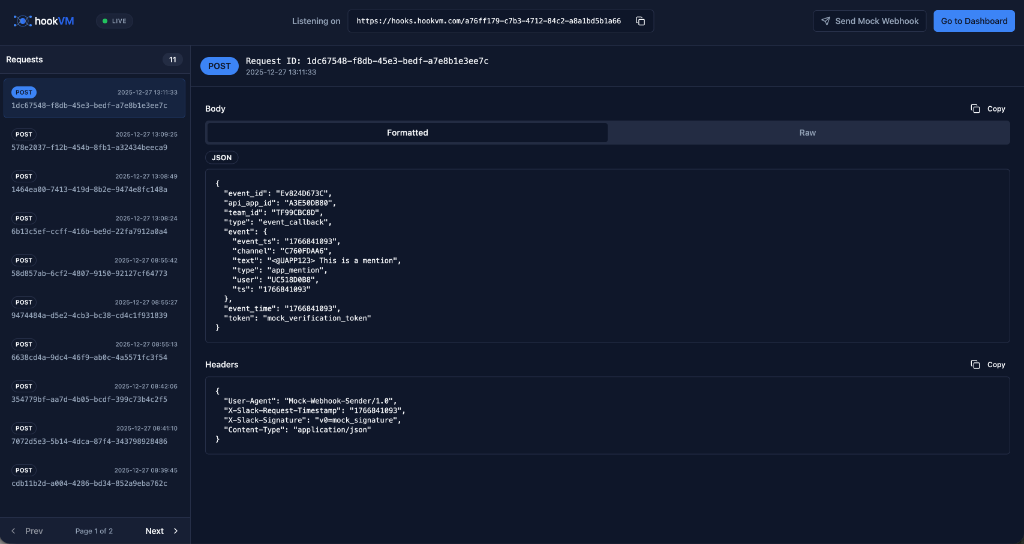
Key Features
Auto-Generated URL: Unique endpoint created on first visit
Live Status: See when endpoint is listening
Request List: All received webhooks
Request Details: Full headers and body
Mock Webhooks: Test with realistic payloads
Copy Functionality: Easy copying of data
Getting Started
Step 1: Access Playground
Navigate to Play in the left sidebar.
What Happens:
- Unique playground URL is created automatically
- Endpoint starts listening immediately
- Ready to receive webhooks
Step 2: Copy Your URL
Listening on: https://hooks.hookvm.com/A7fff178-c7b3-4712-84c2-a8a1b05b1a66
Click the copy icon to copy your unique playground URL.
Use Cases:
- Test webhook integrations
- Debug webhook payloads
- Develop webhook handlers
- Verify webhook signatures
Step 3: Send Webhooks
Send webhooks to your playground URL:
From External Services:
# Configure in service dashboard
Webhook URL: https://hooks.hookvm.com/A7fff178-c7b3-4712-84c2-a8a1b05b1a66
Using cURL:
curl -X POST https://hooks.hookvm.com/A7fff178-c7b3-4712-84c2-a8a1b05b1a66 \
  -H "Content-Type: application/json" \
  -d '{"test": "data"}'
Step 4: View Requests
Requests appear in real-time in the left panel.
Request Count: "11" requests received
Live Updates: New requests appear automatically
Pagination: Navigate through requests
Request List
View all received webhooks in chronological order.
Request Information
Method Badge: POST, GET, PUT, etc.
Request ID: Unique identifier (truncated)
Timestamp: When request was received
Example:
POST  1dc67548-f8db-45e3-bedf-a7e8b1e3ee7c
      2025-12-27 13:19:33
Selecting Requests
Click any request to view full details.
Active Request: Highlighted in blue
Details Panel: Shows headers and body
Auto-Select: First request selected by default
Request Details
View complete request information.
Request ID & Timestamp
Request ID: 1dc67548-f8db-45e3-bedf-a7e8b1e3ee7c
Timestamp: 2025-12-27 13:19:33
Body Section
View the webhook payload in formatted or raw view.
Tabs:
- Formatted: Pretty-printed JSON with syntax highlighting
- Raw: Raw text format
JSON Display:
{
  "event_id": "Ev824D67M",
  "api_app_id": "A3E5E9",
  "team_id": "TF99CRC8",
  "event_callback": "event_callback",
  "event": {
    "event_id": "176681893",
    "event_time": "1760681893",
    "text": "@UAPP123: This is a mention",
    "type": "app_mention",
    "user": "U123456"
  },
  "event_time": "176681893",
  "token": "mock_verification_token"
}
Copy Button: Click "Copy" to copy entire body
Headers Section
View all HTTP headers sent with the request.
Headers Display:
{
  "User-Agent": "Mock-Webhook-Sender/1.0",
  "X-Slack-Request-Timestamp": "1760681893",
  "X-Slack-Signature": "v0=mock_signature",
  "Content-Type": "application/json"
}
Copy Button: Click "Copy" to copy all headers
Common Headers:
Content-Type: Payload formatUser-Agent: Source identificationX-*-Signature: Webhook signaturesX-*-Event-Type: Event type headers
Sending Mock Webhooks
Test with realistic webhook payloads from popular platforms.
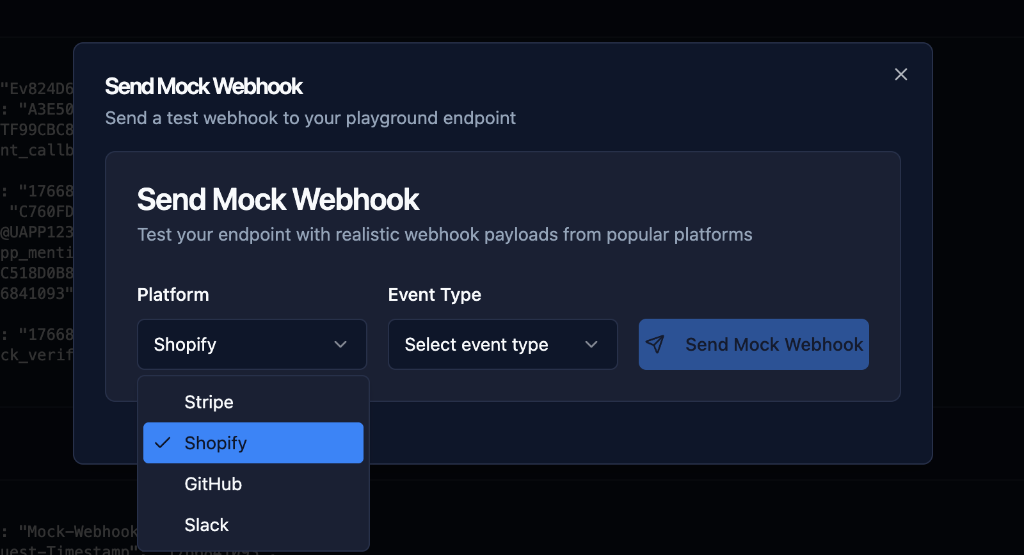
Step 1: Click Send Mock Webhook
Click the "Send Mock Webhook" button in the top right.
Step 2: Select Platform
Platform Dropdown: Choose webhook source
Available Platforms:
- Shopify
- Stripe
- GitHub
- Slack
- (More platforms available)
Use Case: Test with realistic payloads from actual services
Step 3: Select Event Type
Event Type Dropdown: Choose specific event
Examples:
- Shopify: Order created, Product updated, Customer created
- Stripe: Payment succeeded, Invoice paid, Subscription created
- GitHub: Push, Pull request, Issue created
- Slack: Message posted, App mention, Reaction added
Step 4: Send Mock Webhook
Click "Send Mock Webhook" to send test payload.
What Happens:
- Realistic payload is generated
- Appropriate headers are added
- Webhook is sent to your playground URL
- Request appears in list immediately
Use Cases
Testing Webhook Integration
Scenario: Building webhook handler for Stripe
Steps:
- Copy playground URL
- Send Stripe mock webhook
- View payload structure
- Build handler based on payload
- Test with real Stripe webhooks
Debugging Webhook Issues
Scenario: Webhooks not working as expected
Steps:
- Send webhook to playground
- Inspect headers and body
- Verify payload structure
- Check signature headers
- Identify issue
Developing Webhook Handlers
Scenario: Writing code to process webhooks
Steps:
- Send mock webhooks
- Copy payload examples
- Write handler code
- Test with different event types
- Verify all cases work
Verifying Signatures
Scenario: Implementing signature verification
Steps:
- Send mock webhook with signature
- View signature header
- Implement verification logic
- Test with playground
- Verify signature validation
Real-Time Updates
Live Status Indicator
LIVE (Green badge): Endpoint is active and listening
What It Means:
- Playground is ready
- Webhooks will be received
- Real-time updates enabled
Auto-Refresh
New requests appear automatically without page refresh.
How It Works:
- WebSocket connection
- Real-time updates
- Instant notification
Request Count
See total number of requests received.
Display: "Requests 11"
Updates: Increments automatically as requests arrive
Pagination
Navigate through large numbers of requests.
Controls:
- Prev: Previous page
- Page 1 of 2: Current page indicator
- Next: Next page
Items per Page: 10 requests per page
Common Workflows
Quick Webhook Test
# 1. Copy playground URL
# 2. Send test webhook
curl -X POST https://hooks.hookvm.com/YOUR-PLAYGROUND-ID \
  -H "Content-Type: application/json" \
  -d '{"test": "hello world"}'

# 3. View in playground
# 4. Verify payload received
Testing Multiple Platforms
- Send Stripe Mock: Test payment webhooks
- Send GitHub Mock: Test repository webhooks
- Send Slack Mock: Test messaging webhooks
- Compare Payloads: Understand different formats
Building Webhook Handler
// 1. Send mock webhook to playground
// 2. Copy payload structure
// 3. Build handler

app.post('/webhook', (req, res) => {
  const payload = req.body;

  // Based on playground payload
  if (payload.event_type === 'payment.succeeded') {
    // Handle payment success
    console.log('Payment:', payload.data.payment_id);
  }

  res.status(200).send('OK');
});

// 4. Test with playground
// 5. Verify handler works
Debugging Signature Verification
// 1. Send mock webhook with signature
// 2. View signature header in playground
// 3. Implement verification

const crypto = require('crypto');

function verifySignature(payload, signature, secret) {
  const expectedSignature = crypto
    .createHmac('sha256', secret)
    .update(payload)
    .digest('hex');

  return signature === expectedSignature;
}

// 4. Test with playground
// 5. Verify signature validation works
Best Practices
Testing
✅ Use Mock Webhooks: Test with realistic payloads
✅ Test All Event Types: Cover all scenarios
✅ Verify Headers: Check signature headers
✅ Test Error Cases: Try invalid payloads
Development
✅ Copy Payloads: Use as examples in code
✅ Document Structure: Note payload format
✅ Test Incrementally: Build handler step by step
✅ Verify Signatures: Always validate webhooks
Debugging
✅ Inspect Headers: Check all headers
✅ Compare Payloads: Match expected vs actual
✅ Test Locally: Use playground for local dev
✅ Log Everything: Keep detailed logs
Security
✅ Don't Share URL: Keep playground URL private
✅ Rotate Regularly: URL changes on each visit
✅ Avoid Sensitive Data: Don't send real credentials
✅ Use for Testing Only: Not for production
Playground vs Production Endpoints
Playground Endpoint
Purpose: Testing and debugging
Lifetime: Temporary (session-based)
Features: Real-time viewing, mock webhooks
Use Case: Development and testing
Characteristics:
- Auto-generated URL
- No configuration needed
- Real-time request viewing
- Mock webhook support
- Not for production use
Production Endpoint
Purpose: Receiving real webhooks
Lifetime: Permanent
Features: Relay rules, transformations, retries
Use Case: Production integrations
Characteristics:
- Custom configuration
- Relay rules and filters
- Automatic retries
- Signature verification
- Production-ready
Tips & Tricks
Quick Testing
Tip: Use mock webhooks for instant testing
1. Click "Send Mock Webhook"
2. Select platform and event
3. View payload immediately
Payload Examples
Tip: Copy payloads as code examples
// Copy from playground
const examplePayload = {
  "event_id": "Ev824D67M",
  "type": "app_mention",
  "text": "@UAPP123: This is a mention"
};
Local Development
Tip: Use playground for local testing
# No need for ngrok or tunneling
# Just send to playground URL
curl -X POST https://hooks.hookvm.com/YOUR-ID \
  -d @test-payload.json
Signature Testing
Tip: Use mock webhooks to see signature format
1. Send mock webhook
2. View signature header
3. Implement verification
4. Test with real webhooks
Troubleshooting
Requests Not Appearing
Possible Causes:
- Network issues
- Incorrect URL
- Firewall blocking
Solutions:
- Verify URL is correct
- Check network connection
- Try sending mock webhook
- Refresh page
Cannot Send Mock Webhook
Possible Causes:
- Playground not initialized
- Network issues
Solutions:
- Refresh page
- Check network connection
- Try again
Headers Not Showing
Possible Causes:
- No headers sent
- Display issue
Solutions:
- Verify headers were sent
- Check request in list
- Refresh page
Next Steps
- Creating Endpoints - Create production endpoints
- Relay Rules - Configure forwarding
- Common Usage Examples - Integration examples
Start testing! Use the playground to develop and debug your webhook integrations! 🎮