Relay Rules & Forwarding
Automatically forward incoming webhook requests to your external endpoints with powerful filtering and transformation capabilities.
What are Relay Rules?
Relay rules define how hookVM forwards incoming webhook requests to your external URLs. Each rule specifies:
- Destination URL: Where to forward the request
- Retry Configuration: How many times to retry on failure
- Filters: Which requests to forward (optional)
- Transformations: How to modify the payload (optional)
- Signature: Whether to add HMAC signature (optional)
Endpoint Detail Page
After creating an endpoint, you'll see the endpoint detail page with all configuration and monitoring information.
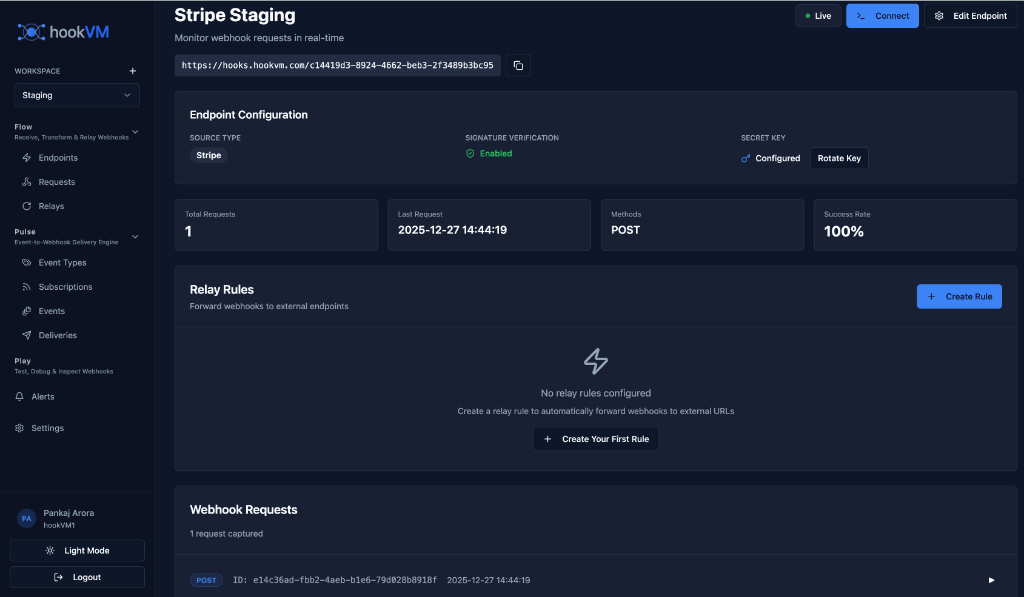
Key Sections
Endpoint Configuration:
- Source Type (e.g., Stripe)
- Signature Verification status
- Secret Key management
Statistics:
- Total Requests received
- Last Request timestamp
- HTTP Method
- Success Rate
Relay Rules:
- List of configured relay rules
- Create new relay rules
- Manage existing rules
Webhook Requests:
- Real-time list of incoming requests
- Click any request to view details
Creating a Basic Relay Rule
Quick Setup (No Filters/Transformations)
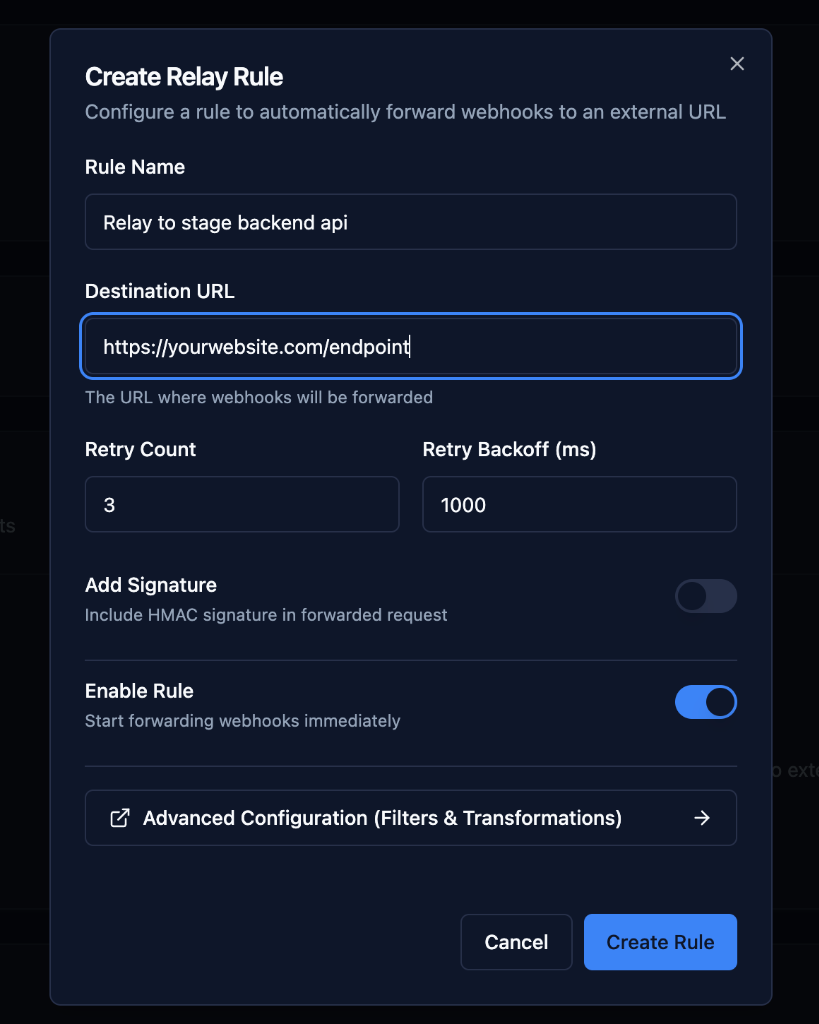
Configuration Fields
Rule Name
Give your relay rule a descriptive name.
Examples:
Relay to stage backend apiForward to production serverSend to analytics service
Destination URL
The external URL where requests will be forwarded.
Format: https://yourwebsite.com/endpoint
Examples:
https://api.yourapp.com/webhooks/stripe
https://staging.yourapp.com/webhooks
https://analytics.yourapp.com/events
Retry Count
Number of times to retry if the destination fails to respond.
Default: 3
Range: 0-10
Recommended: 3-5 for production
Retry Behavior:
- Retry on 5xx errors
- Retry on network timeouts
- Retry on connection failures
- No retry on 4xx errors (client errors)
Retry Backoff (ms)
Time to wait between retry attempts in milliseconds.
Default: 1000ms (1 second)
Range: 100-60000ms
Recommended: 1000-5000ms
Backoff Strategy: Exponential
Attempt 1: Immediate
Attempt 2: After 1000ms
Attempt 3: After 2000ms
Attempt 4: After 4000ms
Add Signature
Include HMAC signature in the forwarded request for verification.
When Enabled:
- Adds
X-HookVM-Signatureheader - Uses HMAC-SHA256 algorithm
- Allows destination to verify authenticity
Use Cases:
- Verify requests came from hookVM
- Prevent request tampering
- Secure internal communications
Enable Rule
Start forwarding requests immediately.
Enabled: Requests are forwarded
Disabled: Rule exists but doesn't forward
Use Cases:
- Temporarily pause forwarding
- Test configuration before enabling
- Maintenance windows
Advanced Configuration
For complex routing scenarios, use Advanced Configuration to add filters and transformations.
Click "Advanced Configuration (Filters & Transformations)" to access:
- Filter Rules
- Transformation Scripts
Filter Rules
Control which requests are forwarded based on conditions.
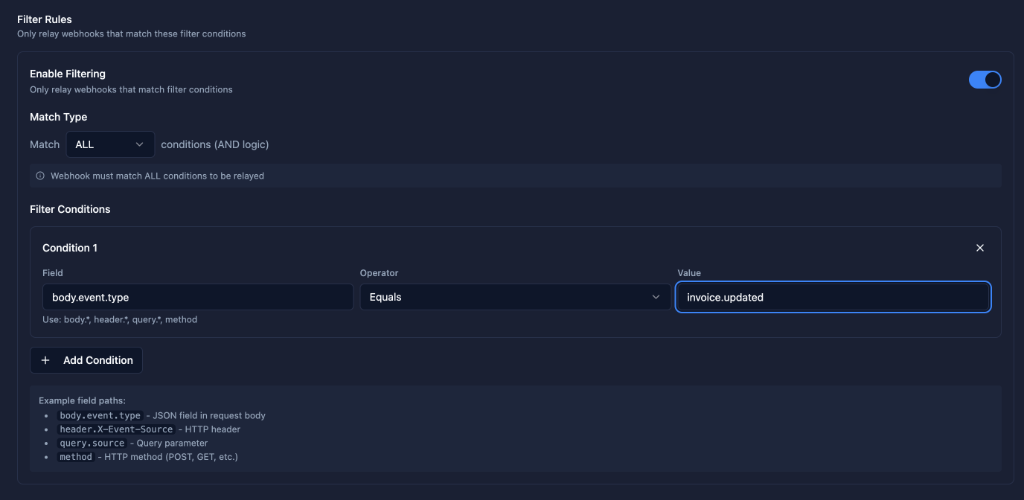
Enable Filtering
Toggle "Enable Filtering" to activate filter conditions.
When Disabled: All requests are forwarded
When Enabled: Only matching requests are forwarded
Match Type
Choose how multiple conditions are evaluated:
ALL (AND logic):
- Request must match ALL conditions
- Stricter filtering
- Example:
event_type = "invoice.updated" AND status = "paid"
ANY (OR logic):
- Request matches if ANY condition is true
- Broader filtering
- Example:
event_type = "invoice.created" OR event_type = "invoice.updated"
Filter Conditions
Define conditions using field paths, operators, and values.
Field Path
Specify the field to check using dot notation.
Syntax:
body.event.type- JSON field in request bodyheader.X-Event-Source- HTTP headerquery.source- Query parametermethod- HTTP method (POST, GET, etc.)
Examples:
body.event.type
body.data.amount
header.X-Stripe-Event
query.source
method
Operators
Equals: Exact match
body.event.type Equals invoice.updated
Contains: Partial match
body.customer.email Contains @example.com
Greater Than / Less Than: Numeric comparison
body.data.amount GreaterThan 10000
Exists: Check if field exists
body.metadata.order_id Exists
Value
The value to compare against.
Examples:
invoice.updated
paid
100
@example.com
Multiple Conditions
Click "+ Add Condition" to add more filter rules.
Example: Filter High-Value Paid Invoices
Condition 1: body.event.type Equals invoice.updated
Condition 2: body.data.status Equals paid
Condition 3: body.data.amount GreaterThan 10000
Match Type: ALL
Example Field Paths
The interface shows helpful examples:
body.event.type- JSON field in request bodyheader.X-Event-Source- HTTP headerquery.source- Query parametermethod- HTTP method (POST, GET, etc.)
Transformation Scripts
Modify webhook payloads before forwarding using JavaScript.
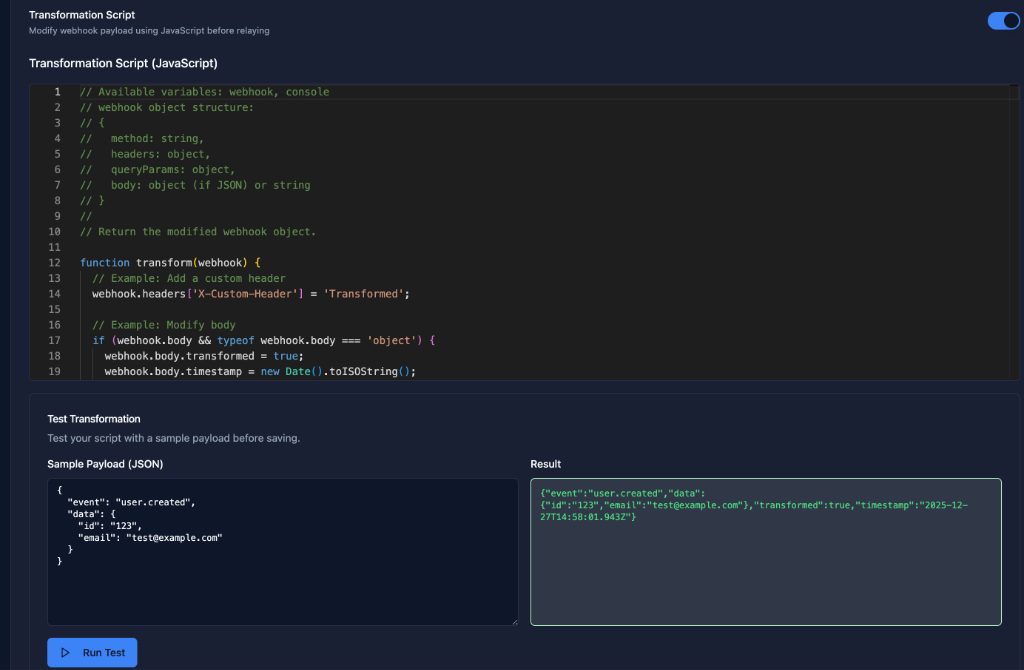
Enable Transformation
Toggle "Transformation Script" to activate payload modification.
JavaScript Editor
Write JavaScript code to transform the webhook object.
Available Variables:
// webhook object structure:
// {
//   method: string,
//   headers: object,
//   queryParams: object,
//   body: object (if JSON) or string
// }
Return Value: Modified webhook object
Transformation Examples
Add Custom Header
function transform(webhook) {
  // Add a custom header
  webhook.headers['X-Custom-Header'] = 'Transformed';
  return webhook;
}
Modify Body
function transform(webhook) {
  // Example: Modify body
  if (webhook.body && typeof webhook.body === 'object') {
    webhook.body.transformed = true;
    webhook.body.timestamp = new Date().toISOString();
  }
  return webhook;
}
Simplify Stripe Payload
function transform(webhook) {
  if (webhook.body && webhook.body.type === 'payment_intent.succeeded') {
    // Simplify Stripe payload
    const original = webhook.body.data.object;
    webhook.body = {
      event: 'payment_success',
      payment_id: original.id,
      amount_usd: original.amount / 100,
      customer_id: original.customer,
      metadata: original.metadata
    };
  }
  return webhook;
}
Extract Nested Data
function transform(webhook) {
  // Extract nested data to top level
  if (webhook.body && webhook.body.data) {
    webhook.body = {
      ...webhook.body.data.object,
      event_type: webhook.body.type
    };
  }
  return webhook;
}
Test Transformation
Before saving, test your transformation script:
- Sample Payload (JSON): Enter a sample webhook payload
- Run Test: Click "Run Test" button
- Result: See the transformed output
Example Test:
Input:
{
  "event": "user.created",
  "data": {
    "id": "123",
    "email": "test@example.com"
  }
}
Output (after transformation):
{
  "event": "user.created",
  "data": {
    "id": "123",
    "email": "test@example.com",
    "transformed": true,
    "timestamp": "2025-12-27T14:58:01.042Z"
  }
}
Complete Workflow
1. Create Endpoint
Create an endpoint to receive webhooks from external sources.
2. Configure Basic Relay Rule
Set up destination URL, retry configuration, and enable the rule.
3. Add Filters (Optional)
Define conditions to selectively forward requests.
4. Add Transformations (Optional)
Modify payloads before forwarding.
5. Test & Monitor
Send test requests and monitor in the Requests section.
Common Use Cases
Fan-Out to Multiple Destinations
Create multiple relay rules for the same endpoint:
Rule 1: Backend API
Name: Forward to Backend
Destination: https://api.yourapp.com/webhooks
Retry Count: 3
Filters: None
Rule 2: Analytics
Name: Send to Analytics
Destination: https://analytics.yourapp.com/events
Retry Count: 5
Filters: body.event.type Contains "payment"
Rule 3: Notifications
Name: Trigger Notifications
Destination: https://notifications.yourapp.com/webhook
Retry Count: 3
Filters: body.data.amount GreaterThan 10000
Conditional Routing
Route different event types to different destinations:
High-Value Payments
Destination: https://api.yourapp.com/high-value-payments
Filters:
  - body.event.type Equals payment_intent.succeeded
  - body.data.amount GreaterThan 100000
Regular Payments
Destination: https://api.yourapp.com/payments
Filters:
  - body.event.type Equals payment_intent.succeeded
  - body.data.amount LessThan 100000
Payload Simplification
Transform complex provider payloads into simple formats:
Stripe to Simple Format
function transform(webhook) {
  if (webhook.body.type === 'payment_intent.succeeded') {
    const payment = webhook.body.data.object;
    webhook.body = {
      event: 'payment_success',
      id: payment.id,
      amount: payment.amount / 100,
      currency: payment.currency,
      customer: payment.customer
    };
  }
  return webhook;
}
Best Practices
Retry Configuration
Production:
- Retry Count: 3-5
- Retry Backoff: 1000-5000ms
- Enable signature verification
Development:
- Retry Count: 1-2
- Retry Backoff: 500-1000ms
- Test without retries first
Filtering
✅ Do:
- Use specific conditions
- Test filters before enabling
- Document filter logic
- Use AND logic for strict filtering
❌ Don't:
- Create overly complex filters
- Use too many OR conditions
- Filter on unreliable fields
Transformations
✅ Do:
- Test transformations thoroughly
- Keep transformations simple
- Add error handling
- Document transformation logic
- Use the test feature
❌ Don't:
- Make transformations too complex
- Modify critical fields
- Remove important data
- Use external API calls
Security
✅ Enable Signature: For production relay rules
✅ Use HTTPS: Always use HTTPS destinations
✅ Validate Destination: Ensure destination URL is correct
✅ Monitor Failures: Check for relay failures regularly
Monitoring & Debugging
View Relay Attempts
In the endpoint detail page:
- Click on any request in "Webhook Requests"
- View relay attempts and responses
- Check success/failure status
- Review error messages
Common Issues
Relay Failing:
- Check destination URL is correct
- Verify destination is accessible
- Check retry configuration
- Review error messages
Filters Not Working:
- Verify field paths are correct
- Check operator logic
- Test with sample payloads
- Review match type (ALL vs ANY)
Transformation Errors:
- Test transformation script
- Check JavaScript syntax
- Verify webhook object structure
- Review error logs
Next Steps
- Viewing Requests - View and debug webhook requests
- Security Best Practices - Secure your relay rules
Ready to forward webhooks? Create your first relay rule and start routing requests! 🚀