Organization Settings
Manage your organization's basic information and preferences.
Organization Details
Configure your organization's core settings.
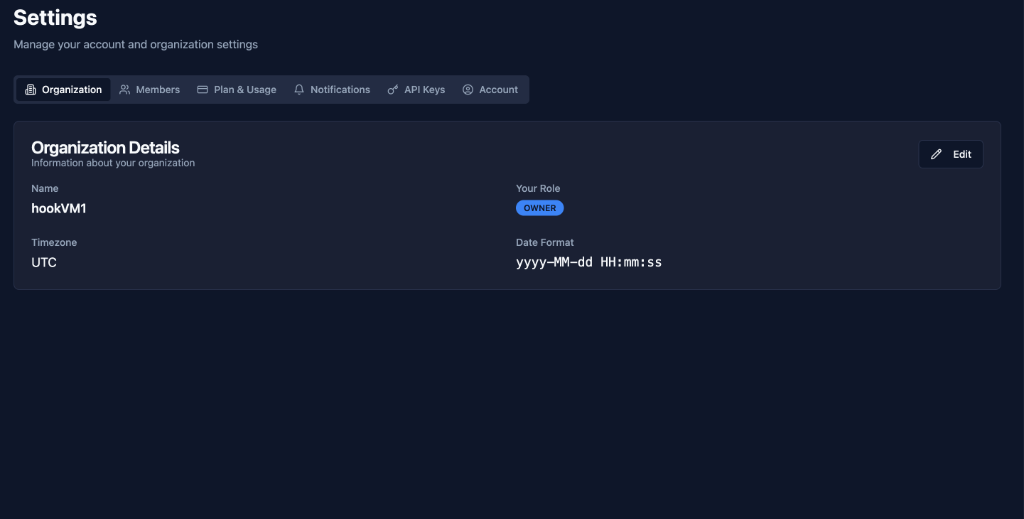
Organization Name
Field: Name
Example: hookVM1
Purpose: Identifies your organization across the platform
Use Cases:
- Branding
- Multi-organization management
- Team identification
Editing:
- Click "Edit" button
- Update organization name
- Save changes
Your Role
Display: Role badge (e.g., OWNER)
Roles:
- OWNER: Full access, billing, delete organization
- ADMIN: Manage members, settings, all features
- MEMBER: Use features, limited settings access
Cannot Change: Your own role (must be changed by another owner/admin)
Timezone Settings
Field: Timezone
Default: UTC
Purpose: All timestamps displayed in this timezone
Common Timezones:
UTC
America/New_York (EST/EDT)
America/Los_Angeles (PST/PDT)
Europe/London (GMT/BST)
Asia/Tokyo (JST)
Affects:
- Request timestamps
- Event timestamps
- Delivery timestamps
- Log timestamps
- Report timestamps
Best Practice: Use UTC for consistency across teams
Date Format
Field: Date Format
Default: yyyy-MM-dd HH:mm:ss
Purpose: How dates and times are displayed
Common Formats:
yyyy-MM-dd HH:mm:ss  →  2025-12-27 14:30:45
MM/dd/yyyy hh:mm a   →  12/27/2025 02:30 PM
dd-MM-yyyy HH:mm     →  27-12-2025 14:30
yyyy/MM/dd HH:mm:ss  →  2025/12/27 14:30:45
Format Tokens:
yyyy: 4-digit yearMM: 2-digit monthdd: 2-digit dayHH: 24-hour formathh: 12-hour formatmm: Minutesss: Secondsa: AM/PM
Best Practices
Organization Name
✅ Use Clear Names: Easy to identify
✅ Include Environment: e.g., "Company Production"
✅ Keep it Short: Easier to read in UI
✅ Be Consistent: Match naming across tools
Timezone
✅ Use UTC: Standard for distributed teams
✅ Match Team Location: If single location
✅ Document Choice: Tell team which timezone
✅ Consider Reporting: UTC best for analytics
Date Format
✅ Be Consistent: Use same format across tools
✅ Consider Locale: Match team's region
✅ Include Seconds: Useful for debugging
✅ Use 24-hour: Avoid AM/PM confusion
Next Steps
- Members - Manage team members
- Plan & Usage - View subscription and usage
- Notifications - Configure alerts
Configure your organization to match your team's preferences! ⚙️