Managing Subscriptions
Create and manage webhook subscriptions that define where to send events for your customers.
What are Subscriptions?
Subscriptions connect event types to customer endpoints. When you send an event, hookVM delivers it to all subscriptions that are listening for that event type.
Key Concepts:
- Subscriber: Your customer who wants to receive webhooks
- Event Type: What events they want to receive
- Endpoint URL: Where to send the webhooks
- Retry Config: How to handle delivery failures
Subscriptions Page
View and manage all webhook subscriptions for your customers.
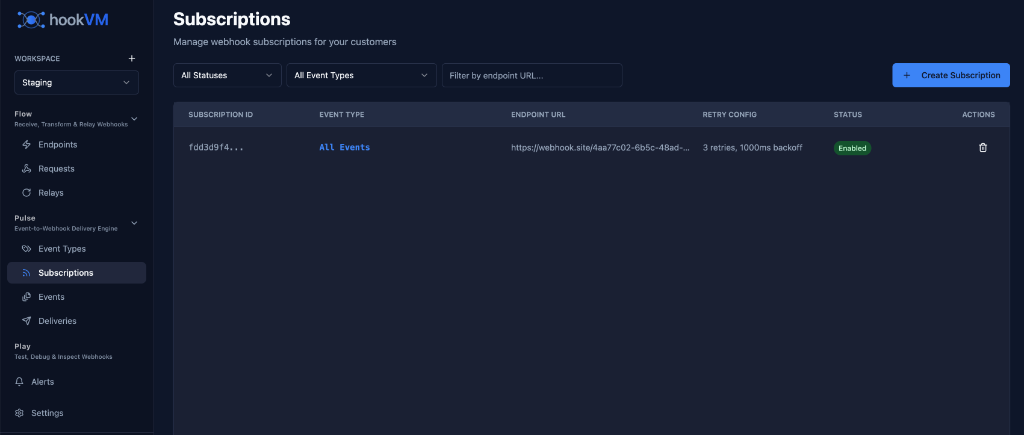
Key Features
Centralized Management: All subscriptions in one view
Filtering: Filter by status, event type, endpoint
Search: Find subscriptions by endpoint URL
Quick Actions: Edit or delete subscriptions
Status Control: Enable/disable subscriptions
Subscription Columns
SUBSCRIPTION ID
Unique identifier for the subscription.
Format: Truncated ID (e.g., fdd3d9f4...)
Use Cases:
- Reference in API calls
- Track in logs
- Debug delivery issues
EVENT TYPE
Which events this subscription receives.
All Events (Blue link):
- Receives all event types
- Automatically includes new event types
- Flexible for customers
Specific Event (e.g., order.shipped):
- Receives only specified event type
- More targeted delivery
- Better for specific integrations
ENDPOINT URL
The customer's webhook URL where events are delivered.
Format: Full HTTPS URL
Example:
https://webhook.site/4ap7c02-6b5c-48ad-...
Requirements:
- Must be HTTPS (secure)
- Must be publicly accessible
- Should return 2xx status codes
RETRY CONFIG
Retry configuration for failed deliveries.
Format: {retry_count} retries, {backoff}ms backoff
Example: 3 retries, 1000ms backoff
Components:
- Retry Count: Number of retry attempts (0-10)
- Backoff: Milliseconds between retries
STATUS
Indicates whether the subscription is active.
Enabled (Green badge):
- Subscription is active
- Events are delivered
- Customer receives webhooks
Disabled (Gray badge):
- Subscription is inactive
- Events are not delivered
- Can be re-enabled anytime
ACTIONS
Quick actions for each subscription.
Delete (Trash icon):
- Remove subscription
- Stop delivering events
- Cannot be undone
Filtering Subscriptions
Use filters to find specific subscriptions quickly.
Filter by Status
Dropdown: "All Statuses"
Options:
- All Statuses
- Enabled
- Disabled
Use Case: View only active or inactive subscriptions
Filter by Event Type
Dropdown: "All Event Types"
Options:
- All Event Types
- Specific event type (e.g.,
order.shipped)
Use Case: Find subscriptions for specific events
Search by Endpoint URL
Search Box: "Filter by endpoint URL..."
Type to search for subscriptions by endpoint URL.
Use Case: Find a customer's subscription quickly
Creating a Subscription
Via UI (Manual)
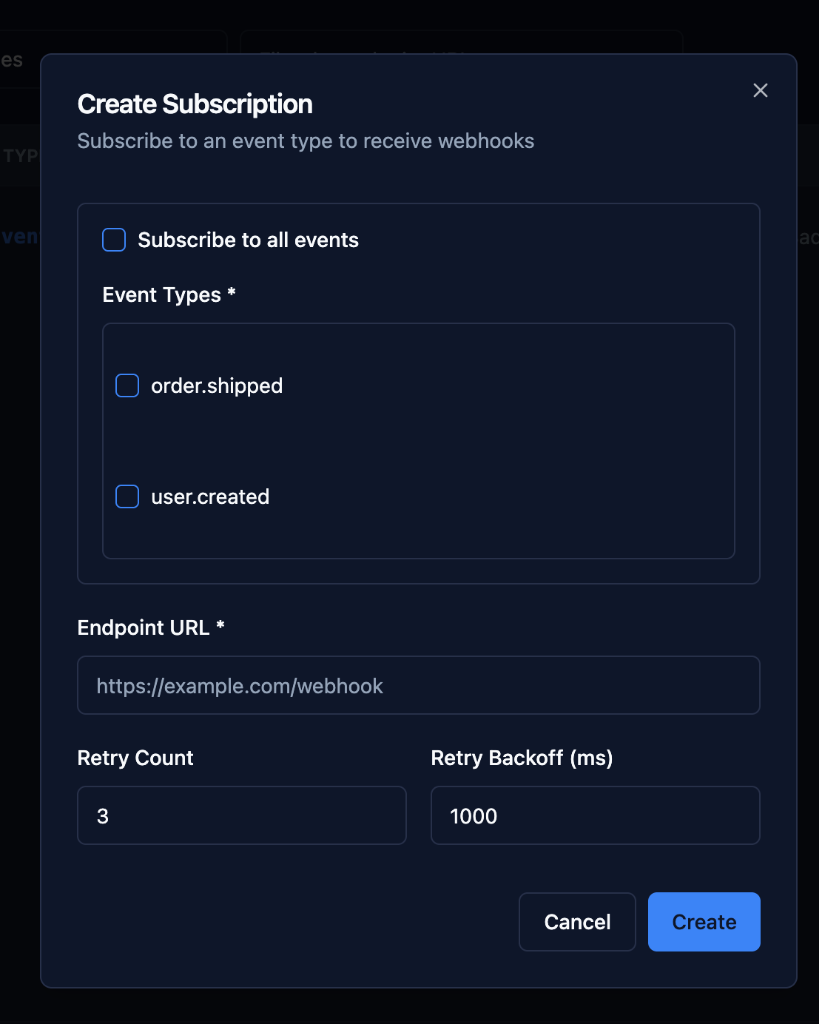
Step 1: Click Create Subscription
Click the "+ Create Subscription" button in the top right.
Step 2: Select Event Types
Subscribe to all events (Checkbox):
- ☑ Checked: Receive all event types
- ☐ Unchecked: Select specific event types
Event Types (Multi-select):
order.shippeduser.created- Select one or more event types
Best Practice: Start with specific events, expand later
Step 3: Configure Endpoint URL
Endpoint URL (Required):
https://example.com/webhook
Requirements:
- Must start with
https:// - Must be valid URL format
- Should be publicly accessible
Examples:
https://api.customer.com/webhooks
https://webhook.site/unique-id
https://customer.ngrok.io/webhooks
Step 4: Configure Retry Settings
Retry Count (Default: 3):
- Number of retry attempts
- Range: 0-10
- Recommended: 3-5
Retry Backoff (ms) (Default: 1000):
- Milliseconds between retries
- Range: 100-60000ms
- Recommended: 1000-5000ms
Retry Strategy: Exponential backoff
Attempt 1: Immediate
Attempt 2: After 1000ms
Attempt 3: After 2000ms
Attempt 4: After 4000ms
Step 5: Create Subscription
Click "Create" to save the subscription.
Via API (Recommended)
Create subscriptions programmatically using the hookVM API.
Endpoint:
POST /api/v1/subscriptions
Headers:
Content-Type: application/json
Authorization: Bearer YOUR_API_KEY
Request Body:
{
  "event_types": ["order.shipped", "order.delivered"],
  "endpoint_url": "https://customer.com/webhooks",
  "retry_count": 3,
  "retry_backoff_ms": 1000,
  "enabled": true
}
Response:
{
  "subscription_id": "sub_abc123def456",
  "event_types": ["order.shipped", "order.delivered"],
  "endpoint_url": "https://customer.com/webhooks",
  "retry_count": 3,
  "retry_backoff_ms": 1000,
  "enabled": true,
  "created_at": "2025-12-27T10:00:00Z"
}
Via SDK
Use hookVM SDKs for easier integration.
Node.js:
const hookvm = require('@hookvm/node');

const client = new hookvm.Client('your-api-key');

const subscription = await client.subscriptions.create({
  eventTypes: ['order.shipped', 'order.delivered'],
  endpointUrl: 'https://customer.com/webhooks',
  retryCount: 3,
  retryBackoffMs: 1000,
  enabled: true
});

console.log('Subscription created:', subscription.id);
Python:
import hookvm

client = hookvm.Client('your-api-key')

subscription = client.subscriptions.create(
    event_types=['order.shipped', 'order.delivered'],
    endpoint_url='https://customer.com/webhooks',
    retry_count=3,
    retry_backoff_ms=1000,
    enabled=True
)

print(f'Subscription created: {subscription.id}')
Go:
package main

import (
    "github.com/hookvm/hookvm-go"
)

func main() {
    client := hookvm.NewClient("your-api-key")

    subscription, err := client.Subscriptions.Create(&hookvm.SubscriptionCreateParams{
        EventTypes:     []string{"order.shipped", "order.delivered"},
        EndpointURL:    "https://customer.com/webhooks",
        RetryCount:     3,
        RetryBackoffMs: 1000,
        Enabled:        true,
    })

    if err != nil {
        panic(err)
    }

    fmt.Printf("Subscription created: %s\n", subscription.ID)
}
Managing Subscriptions
Editing Subscriptions
Via UI:
- Click on subscription row
- Update event types, endpoint, or retry config
- Save changes
Via API:
curl -X PATCH https://api.hookvm.com/v1/subscriptions/sub_abc123 \
  -H "Authorization: Bearer YOUR_API_KEY" \
  -H "Content-Type: application/json" \
  -d '{
    "event_types": ["order.shipped"],
    "retry_count": 5
  }'
Disabling Subscriptions
Via UI:
- Click on subscription
- Toggle status to Disabled
- Save changes
Via API:
curl -X PATCH https://api.hookvm.com/v1/subscriptions/sub_abc123 \
  -H "Authorization: Bearer YOUR_API_KEY" \
  -H "Content-Type: application/json" \
  -d '{"enabled": false}'
Effect:
- Events are not delivered
- Subscription remains in system
- Can be re-enabled anytime
Deleting Subscriptions
Via UI:
- Click delete icon
- Confirm deletion
- Subscription removed
Via API:
curl -X DELETE https://api.hookvm.com/v1/subscriptions/sub_abc123 \
  -H "Authorization: Bearer YOUR_API_KEY"
Effect:
- Subscription permanently removed
- Events no longer delivered
- Cannot be recovered
Subscription Patterns
All Events Subscription
Subscribe to all event types automatically.
Use Case: Customer wants all events
Configuration:
{
  "subscribe_to_all_events": true,
  "endpoint_url": "https://customer.com/webhooks"
}
Benefits:
- Automatically includes new event types
- No need to update subscription
- Flexible for customers
Drawbacks:
- Customer receives all events
- May include unwanted events
- Higher volume
Specific Events Subscription
Subscribe to specific event types only.
Use Case: Customer wants targeted events
Configuration:
{
  "event_types": ["order.shipped", "order.delivered"],
  "endpoint_url": "https://customer.com/webhooks"
}
Benefits:
- Targeted delivery
- Lower volume
- More control
Drawbacks:
- Must update for new events
- More management overhead
Multi-Endpoint Subscriptions
Create multiple subscriptions for different endpoints.
Use Case: Customer has multiple systems
Example:
// Subscription 1: Orders to order system
await client.subscriptions.create({
  eventTypes: ['order.shipped', 'order.delivered'],
  endpointUrl: 'https://customer.com/orders/webhooks'
});

// Subscription 2: Users to CRM system
await client.subscriptions.create({
  eventTypes: ['user.created', 'user.updated'],
  endpointUrl: 'https://customer.com/crm/webhooks'
});

// Subscription 3: All events to analytics
await client.subscriptions.create({
  subscribeToAllEvents: true,
  endpointUrl: 'https://customer.com/analytics/webhooks'
});
Retry Configuration
Retry Count
Number of times to retry failed deliveries.
Recommendations:
- Critical events: 5-10 retries
- Standard events: 3-5 retries
- Non-critical events: 1-2 retries
Example:
{
  "retry_count": 5,
  "retry_backoff_ms": 2000
}
Retry Backoff
Time to wait between retry attempts.
Recommendations:
- Fast retry: 500-1000ms
- Standard retry: 1000-5000ms
- Slow retry: 5000-30000ms
Exponential Backoff:
Attempt 1: Immediate
Attempt 2: After 1000ms (1s)
Attempt 3: After 2000ms (2s)
Attempt 4: After 4000ms (4s)
Attempt 5: After 8000ms (8s)
When Retries Occur
Retried:
- 5xx server errors
- Network timeouts
- Connection failures
- DNS resolution failures
Not Retried:
- 2xx success codes
- 4xx client errors
- Invalid endpoint URL
Best Practices
Subscription Management
✅ Use API/SDK: Automate subscription creation
✅ Validate URLs: Ensure endpoints are accessible
✅ Set Appropriate Retries: Balance reliability and cost
✅ Monitor Deliveries: Track success rates
Customer Onboarding
✅ Provide Examples: Show sample webhook payloads
✅ Test Endpoints: Verify before going live
✅ Document Events: Explain what each event means
✅ Offer Sandbox: Let customers test safely
Security
✅ Use HTTPS: Always require secure endpoints
✅ Verify Signatures: Provide signature verification
✅ Rotate Secrets: Update signing secrets regularly
✅ Monitor Failures: Alert on suspicious patterns
Performance
✅ Batch Creation: Create subscriptions in bulk
✅ Cache Subscriptions: Reduce API calls
✅ Monitor Volume: Track event delivery rates
✅ Optimize Retries: Don't over-retry
Common Use Cases
SaaS Customer Webhooks
Scenario: SaaS platform sending webhooks to customers
Implementation:
// When customer signs up
async function onCustomerSignup(customer) {
  // Create subscription for customer
  const subscription = await hookvm.subscriptions.create({
    eventTypes: ['user.created', 'subscription.updated'],
    endpointUrl: customer.webhookUrl,
    retryCount: 5,
    retryBackoffMs: 2000,
    metadata: {
      customerId: customer.id,
      customerName: customer.name
    }
  });

  // Store subscription ID
  await db.customers.update(customer.id, {
    webhookSubscriptionId: subscription.id
  });
}
E-commerce Order Notifications
Scenario: E-commerce platform notifying fulfillment partners
Implementation:
// Create subscription for fulfillment partner
await hookvm.subscriptions.create({
  eventTypes: [
    'order.created',
    'order.paid',
    'order.cancelled'
  ],
  endpointUrl: 'https://fulfillment.partner.com/webhooks',
  retryCount: 10, // Critical for fulfillment
  retryBackoffMs: 5000
});
Multi-Tenant Application
Scenario: Multi-tenant app with per-tenant webhooks
Implementation:
// Create subscription per tenant
async function createTenantSubscription(tenant) {
  return await hookvm.subscriptions.create({
    subscribeToAllEvents: true,
    endpointUrl: `https://${tenant.subdomain}.app.com/webhooks`,
    retryCount: 3,
    retryBackoffMs: 1000,
    metadata: {
      tenantId: tenant.id,
      tenantName: tenant.name
    }
  });
}
Troubleshooting
Subscription Not Receiving Events
Possible Causes:
- Subscription is disabled
- Event type doesn't match
- Endpoint URL is incorrect
- Endpoint is not accessible
Solutions:
- Verify subscription status is Enabled
- Check event types match what you're sending
- Test endpoint URL manually
- Check firewall/network settings
All Deliveries Failing
Possible Causes:
- Endpoint is down
- Endpoint returns errors
- Network issues
- Invalid endpoint URL
Solutions:
- Test endpoint with curl
- Check endpoint logs
- Verify endpoint is accessible
- Update endpoint URL if needed
Cannot Create Subscription
Possible Causes:
- Invalid endpoint URL format
- Duplicate subscription
- API key lacks permissions
Solutions:
- Validate URL format (must be HTTPS)
- Check for existing subscription
- Verify API key permissions
Next Steps
- Sending Events - Send events to subscriptions
- Monitoring Deliveries - Track delivery status
- Event Types - Manage event types
Ready to notify customers? Create subscriptions and start delivering events! 🚀